AI slop is rampant these days, infecting our internet experience, as well as degrading our codebases. And while I’ve seen a lot of lamenting, I’d like to see more guides on how to avoid it. So, I wrote my own! It’s limited to coding, because while I will run a blog post through an AI review once I’m done, my advice for writing in general is: don’t use AI. Let’s dive in.
Oxide’s RFD 576 states:
[…] human judgement remains firmly in the loop: even if or as an LLM is generating an artifact that we will use (writing, test cases, documentation, code, etc.), their output is the responsibility of the human using them.
I believe this is key to using an LLM to code: remaining responsible, “at the steering wheel” so to speak, keeps the slop at bay.
How to tell when your human judgement is slipping? It can happen to all of us, we get tired, we make mistakes. We live in bodies after all. But there’s a difference in the habitual attitude towards their own code of someone who takes ownership over their PRs, and someone who generates slop.
In this blog post, I’ll outline how to tell when you’re generating slop, and give some foundational tips on stopping and developing a habit of ownership. Self-monitoring is key. This means using emotional intelligence skills. There are four emotional “horses of the apocalypse”. You need to recognize when you are bored, confused, frustrated, or fatigued because these are signals that slop is sneaking in. I wrote this blog post thinking about folks who are new to this type of introspection, or who may deal with some level of alexithymia, so I’ll describe what these emotions feel like at the beginning of each section, but I’ll also give technical tips to help you avoid slop generation at the end.
Note: Vague terms like “doing AI” bother me. But there’s a plethora of tools and it’s difficult to categorize them. In this post, I’ll use the term “AI Copilot” to mean tools like Claude Code, GitHub Copilot, or Cursor.
1. Boredom
Boredom feels flat and a little sad. It can show up in the body like an itch, or a vague very light nausea. It’s often accompanied by distraction from the current task, which I think is why some people say it’s good for you: it drives you to discover new things or learn new skills. But while it can be good, it can also be a sign something is wrong (remember, emotions are neutral).
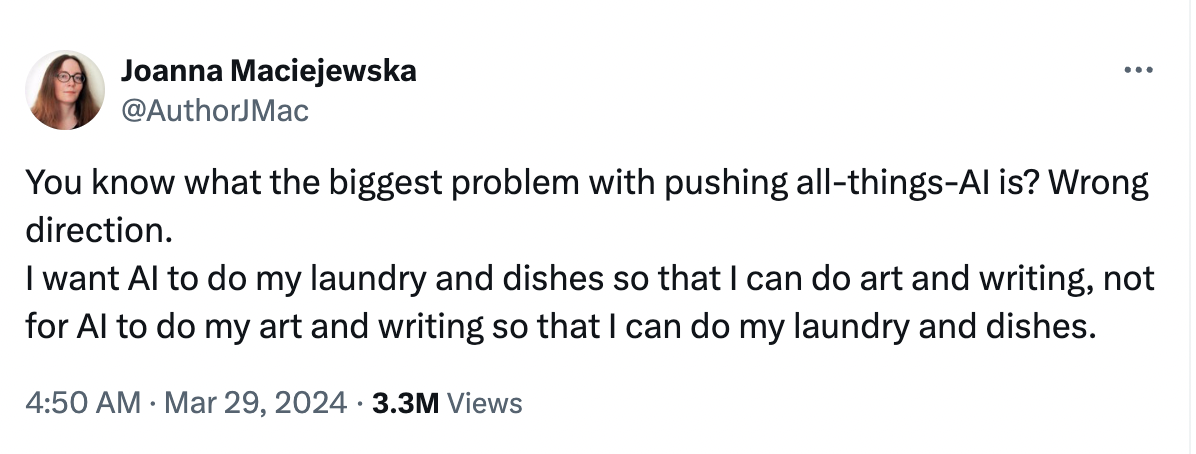
Generating slop is so, so boring. Why? You’re not solving any problems, you’re letting AI solve the problem for you. Flow state is associated with a better mood and sense of meaningfulness, but you won’t be feeling much of that if you’re just pointing an AI copilot to a ticket generating a PR, then taking review comments and feeding them back to the copilot. This is maddening to the coworker reviewing your PR but also, where’s the fun in it? You are “doing laundry” for AI.
2. Confusion
Confusion is stressful. It feels a little bit like anger, but in the end, you’re not sure what to be angry at. It’s loss of clarity and calm at its core. It’s like inhaling smog while you’re waiting for the crosswalk to clear.
If you hand the steering wheel and all control to an AI copilot, confusion will set in soon after. You’ll have changes in 26 files after an hour of work, but that hour is wasted because after clicktesting you found a bug, and you don’t know where the cause in the 4000L diff lies. Your PR reviewer will ask you to defend a style change, and you won’t even have been aware that the changes existed. Detaching yourself from the code in this manner means you won’t be able to control the output, but your input will also suffer. Your prompts will become short and inefficient. You may even find yourself just copy pasting error messages into the chat window.
3. Frustration
Frustration is anger borne of bearing with repeated small offenses or failures. It is a chafing of the heart.
Yes, if you want to avoid feeling frustrated in general, you probably shouldn’t be coding at all. It’s natural to feel like throwing your laptop out the window after spending hours working on a particularly nasty bug, getting nowhere. But here’s the kicker: you should be frustrated at the problem, not at the AI copilot. You see, the less context you bring to the table, the poorer your prompts are, the worse an AI copilot performs. It will seem like the copilot is giving the same feedback over and over again, when in fact, it is your own brain running in circles.
4. Fatigue
Fatigue is tiredness. Mental tiredness, in this case, which means you’ll feel less of a “spark” in terms of new ideas or you will feel less energy to do your daily tasks at the desk.
All of this boredom, confusion, and frustration means you will get tired quick. The brain fog sets in fast you didn’t understand the problem you were trying to solve in the first place. Going back and forth multiple times in large-diff PRs won’t be energizing either. You might get headaches from staring at your screen too much, from the stressful combination of frustration, boredom, confusion, and general productivity slowdown. This type of malaise sucks.
The Cure
The good news is, using AI tooling doesn’t have to be like this. There are proactive actions you can take to avoid the 4 horses of the Slopocalypse. If you’ve been reading this blog and feeling the prickle of identification with these emotions, or some embarrassment in the pit of your stomach, there is help.
I’m splitting my advice into two sections: the first section includes age-old advice that applied before the age of AI tooling, but, I maintain it has deeper impact the way our work has changed in the past few years. The second part are technical practices you can begin to use as guardrails from generating poor code with AI tooling.
Part One: Solid Old advice
1. Take breaks.
I put this at the top because it’s the foundation for the rest of the preventatives. Touch grass, frequently. I forget what self-help author said this, but “A phone is not a break”. Get up, use the bathroom, empty the dishwasher in your kitchen or the break room. Make some tea or coffee. If you find yourself in deep focus for a few hours, that’s fantastic, but on days when that’s not happening I like using the old-fashioned pomodoro method. 25 minutes on, 5 minutes off, a 15 minute break every 4 or so hours. This website is great tab to have open when you’re practicing pomodoro. Your brain is in a body, and to keep your brain fresh an in control of your toolchain at work, you need breaks. Be disciplined about this.
2. Use an old-fashioned notebook.
This will keep your brain online and energized in a way typing won’t keep it, as typing and handwriting recruit different areas of the brain. Thanks, evolution! For example, handwriting involves the cuneus/ precuneus, needed for visual processing and attention, and these areas of the brain are not involved in typing. I’m not saying typing is bad, but why not activate this writing area of your brain for problem solving? Get out a notebook, diagram the issue, and your contextual understanding will deepen. I used a notebook to write the first draft of this blog post, in fact. I couldn’t afford a computer until the second semester of my senior year in college so I wrote the entire first draft of my thesis on paper and you know what? It was probably better written that way.
3. Pair early and often.
I’m not defining “pairing” formally, I just mean 2 people in front of 1 screen. I also don’t care whether it’s remote or in-office, but pairing 1-2x per day is how problems are solved and engineering team culture is forged. If you’re new to a team, don’t be afraid to use AI tooling in front of a coworker, but do ask them how it is used on the team.
Speaking of how AI is used on teams, time to get to the technical stuff.
Part Two: Tips For Responsible AI Copilot Use
1. Be careful with AI usage when you’re getting used to a new codebase.
Take good first issues and do them manually so you can understand the codebase well enough to correct AI when the time comes. Claude Code has a built in learning output style you can use to have it teach you by stepping back and having you code certain pieces by hand.
2. Keep your PRs short.
Have empathy for your reviewer who is carefully reading it line by line. Before adding a new feature, consider: can this be broken up into smaller steps, smaller diffs? Is there any refactoring (DRY, new utility methods, etc) that can be done before the real meat of the feature is added?
3. Make sure tooling is up-to-date.
When you’re onboarding a new team, you are responsible for
improvements to the on-call runbook, or CI running smoothly.
You are also responsible for making
adjustments to AI tooling configuration. This means that if you get feedback from a coworker regarding poor code
style in a PR, you take that feedback to heart but you can also take the opportunity to add this
to AGENTS.md or copilot-instructions.md so that the AI copilot is less likely to generate poor
code in the future. You also need to understand common workflows, and volunteer to add them to SKILLS.md
or create custom agents.
4. Keep a PR checklist.
Make sure you’ve self-reviewed for obvious blunders, like wet code (opposite of DRY right?), comments left in, files that shouldn’t be committed. Check that your tests are robust, and that you’re not creating new methods when utility methods pre-exist. Checklists will vary from codebase to codebase and team to team, but it should involve some version of making sure your code, no matter the language it’s written in, is clean, readable and performant. Your change should also be small and reversible.
Conclusion
These are the most helpful antidotes to slop that I’ve come up with. I’m sure more is out there, and I’d love to hear what you have to say. Drop me a line on LinkedIn. Stay emotionally intelligent, use your EQ to self-monitor your work, and you’ll be using AI responsibly soon enough.
I like to say AI tooling is the new “Excel” of resumes. You’ve got to have it, but the distance between power users and those who can just save a spreadsheet, or open a chat, is vast. Much of that difference will lie with you and your determination to master clean code style, team communication, and AI tooling. If you stay aware of when you’re feeling frustrated, fatigued, bored or confused, you’ll have a head start.
Resources:
- Oxide RFDs
- Claude Code docs
- GitHub Copilot docs
- Cursor docs
