
Intro
Skills can help improve the accuracy of agent output, which is fantastic given the probabilistic nature of the results. But how do you test, or evaluate, these skills? How do you avoid context bloat? You’ll need more than a SKILL.md for this, in fact, you’ll need to start thinking of your skill as a package of files.
Wouldn’t adding more files create context bloat?
You might balk at the idea of adding extra files here, knowing that your SKILL.md is recommended to be less than 500 lines. And that’s the right instinct!
Your SKILL.md is loaded into context when you use a skill, and it better be short, or it will mess with your window. But there’s something called progressive disclosure that is built into the agent spec itself that you can take advantage of.
Progressive Disclosure: How It Works
Just a note: by progressive disclosure, I’m not referring to the agentic design pattern that aligns the AI experience with different user groups.
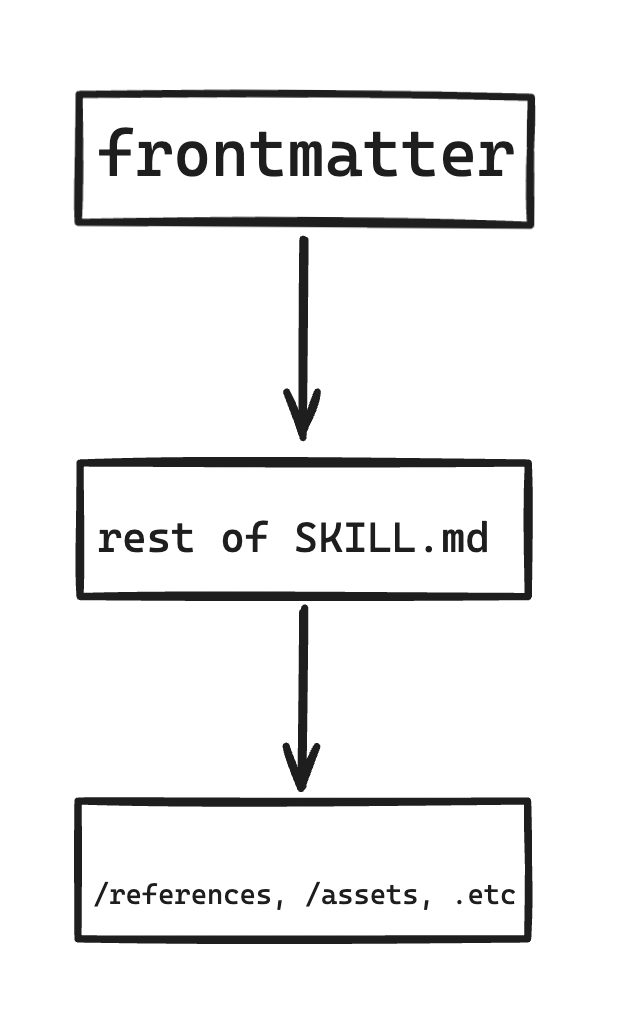
I’m talking about the way the agent loads skill context. The first thing agents load is the name and description of the skill. These are set in the skill frontmatter, for example:
| **name** | a11y-astro |
| **description** | Accessibility review skill for Astro sites with MDX content.
Use this skill whenever the user asks to audit, check, review, or improve the accessibility of their Astro project
 — including .astro layout files, MDX articles, CSS, and any custom components. Also trigger when the user mentions WCAG,
  a11y, screen readers, contrast, skip links, focus, ARIA, or asks "is my site accessible?" even if the full context
  isn't clear yet. This skill covers both static analysis of source files and concrete fix recommendations
  grounded in WCAG 2.2 AA and the A11Y Project checklist. |
The name and description are paramount to the skill’s performance. Why? Well, if you want the agent to recognize it, you’re going to need to write very precise frontmatter, because this is how the agent “decides” to use a skill. Only after this decision does the agent activate and load the instructions in the full SKILL.md . So: use imperative language. Be detailed but not verbose.
The last thing the agent loads is files under /references or /assets. These might be code snippets that need not be loaded for every use of the skill, say, if the skill is for writing http requests and the skill might need different context based on whether the user needs a PUT or PATCH request.
So basically, progressive disclosure looks like this loading process:
Evals: What They Can and Can’t Guarantee
Here’s a head-scratcher: if AI output is non-deterministic, how can you be sure your skill will provide the right output 100% of the time? The short answer is: you can’t. That’s the definition of “non-deterministic”! However, you can help yourself out by running tests and looking at the percentage of the time your skill passes the tests. The skill spec shows us the format for these evaluations:
{
  "skill_name": "csv-analyzer",
  "evals": [
    {
      "id": 1,
      "prompt": "I have a CSV of monthly sales data in data/sales_2025.csv. Can you find the top 3 months by revenue and make a bar chart?",
      "expected_output": "A bar chart image showing the top 3 months by revenue, with labeled axes and values.",
      "files": ["evals/files/sales_2025.csv"]
    },
    {
      "id": 2,
ETC.
}
Basically, it’s a JSON file with an array of evals. Each object has 3 fields here: an id, a prompt, and an expected output, with an optional filepath to compare output against. You then spin up 2 agents for each prompt: one that runs with the skill, and one that runs without it, then you can compare outputs by asking to see a dashboard with results.
Here’s what mine looked like:
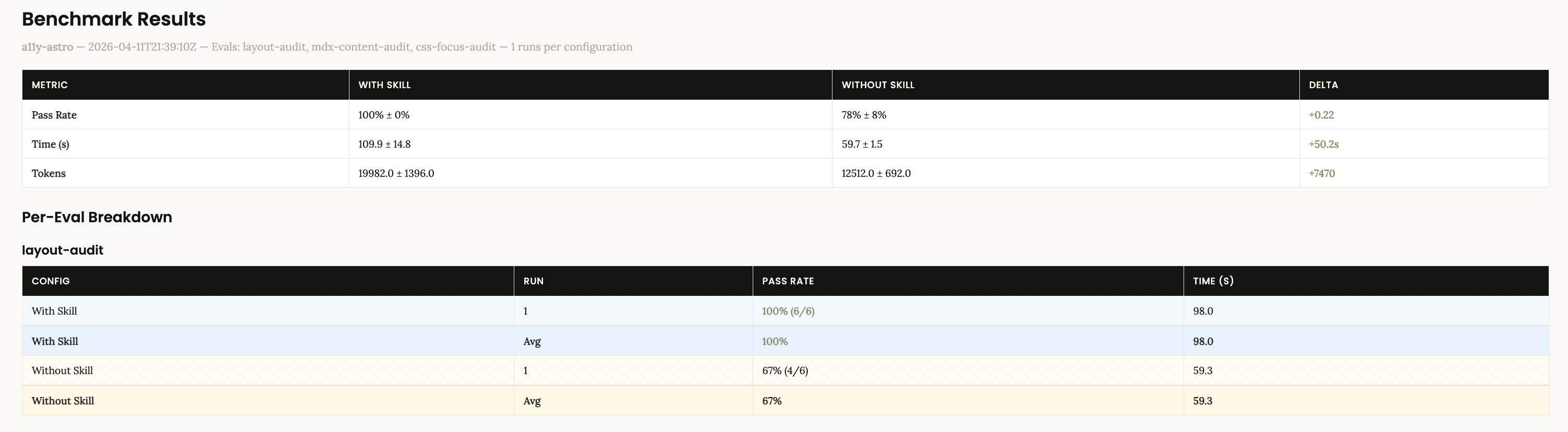
Now, of course, we’re asking AI to verify AI here, which is a limitation. Once you have the results, inspect them. Like with any product, you might even want to formally user-test your skills to see how useful other developers find them. User testing is a whole other subject, but remember, AI is non-deterministic, not a templating service, so your users should understand that the results should vary but that in the end the skill should accomplish its task.
When You DON’T Need More Than a SKILL.md
Now, sometimes, you might not need more than a short SKILL.md. If you’re building a skill for internal use only, plus it has a narrow application, say for help with some sort of GitHub workflow, then manual verification might be enough.
On the other hand, skills meant for external use should have an /evals folder. Depending on your LLM budget, you could even figure out a way to run these in CI. Skills that result in large projects may require breaking down snippets and instructions into /references depending on the agent’s needs.
Resources
Hopefully this was helpful.
If you’re interested in learning more, read the spec end-to-end. You won’t regret it.
There’s also this YouTube video that does a great job of explaining progressive disclosure.